
What are we trying to see?何を見ようとしている?
This page is about one of our first successful examples: the affine curve \(E:w^2=z(z-1)(z-2)\). Its smooth projective completion is the cubic \(Y^2Z=X(X-Z)(X-2Z)\), so by the genus formula for a smooth plane cubic we expect genus \(1\). In ordinary mathematical language: after projective completion, it should look like a torus.
このページで扱うのは、最初にうまく見えた例の一つであるアフィン曲線 \(E:w^2=z(z-1)(z-2)\) です。その滑らかな射影化は三次曲線 \(Y^2Z=X(X-Z)(X-2Z)\) で、滑らかな平面三次曲線の種数公式から種数は \(1\) のはずです。つまり、射影化した全体像としてはトーラスに見えてほしい、というのが出発点です。
So the question here is not “can a headset prove genus \(1\)?” but rather “can 3D VR widen our visual intuition enough that genus \(1\) feels genuinely visible?”
したがってここでの問いは、「VRゴーグルが種数 \(1\) を証明できるか」ではなく、「3D VRによって人間側の認知を少し広げて、種数 \(1\) が“目で見て確認できた”と思えるところまで持っていけるか」です。
How do we draw it?どう描いている?
We choose either \(\Im w=c\) or \(\Im z=c\) and draw the resulting real curve in white. Then we move \(c\) through an interval and accumulate the traces in a red-to-blue gradient. Roughly speaking, the white curve is the current slice, while the gradient remembers where nearby slices have been.
\(\Im w=c\) または \(\Im z=c\) を選び、そのとき得られる実曲線を白で描きます。さらに \(c\) をある区間で動かし、その軌跡を赤から青へのグラデーションで重ね描きします。大まかに言えば、白い曲線が「いま見ている切断」、グラデーションが「その近くの切断族の履歴」です。
The point is to look at a whole family, not a single still picture. As \(c\) moves, reconnections and near-critical behaviour become easier to spot than in a stack of unrelated screenshots.
大切なのは、一枚の静止画ではなく、切断族全体を見ることです。\(c\) を動かすと、つながり方の変化や臨界的なふるまいが、ばらばらのスクリーンショットを見比べるよりもずっと追いやすくなります。
How did we build it with Chapio-kun?ちゃぴおくんと、どう作った?
We began by asking Chapio-kun how to start drawing in Godot and what the basic VR components meant. Following that guidance, we added the common origin, headset pose and left/right controller tracking, and first reached the point where a cube could be seen in VR. At that stage we had not yet planned the reusable VR foundation as a separate project; we were simply building the minimum environment needed to see and control something in the headset.
最初は、GodotでVR表示を始めるにはどうすればよいか、出てくる基本的な概念や用語は何を意味するのかを、ちゃぴおくんに教えてもらうところから始めました。その案内に従って、原点にあたるもの、ゴーグルの位置や向きを反映するもの、左右のコントローラーを追跡するものなどを一つずつ加え、まずはVR内に立方体が見えるところまで進みました。この時点では、後に「VR基本構成」として切り出すことまでは考えておらず、まず何かを見て動かせる最小環境を作っていた、という段階です。
Once that base worked, the mathematical idea came from us. In Japanese natural language, we explained how we wanted to represent a smooth plane cubic in three dimensions: which real coordinates should determine position, which imaginary coordinate should be fixed as a slice parameter and moved with the controller, and how the family should be shown. Chapio-kun then drafted and edited the code needed to realize that idea.
その土台が動いた後で、数学的なアイデアはこちらから伝えました。非特異な平面三次曲線について、どの実座標を3D空間の位置に使い、どの虚部を切断パラメータとして固定してコントローラーで動かすか、切断族をどのように見せたいかを、自然言語の日本語でちゃぴおくんに説明しました。あとは、そのアイデアを実現するためのコードの作成・編集をちゃぴおくんに手伝ってもらいました。
Screenshots from the prototype試作からのスクリーンショット
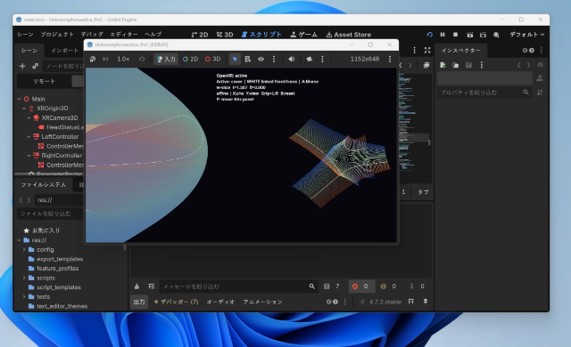
The right-hand side shows the coloured family of slices. The left-hand side is a torus-like synchronized view that helped us read the same motion topologically.右側が色付き切断族です。左側には、同じ動きを位相的に読みやすくするための、トーラスらしい同期表示を置いています。
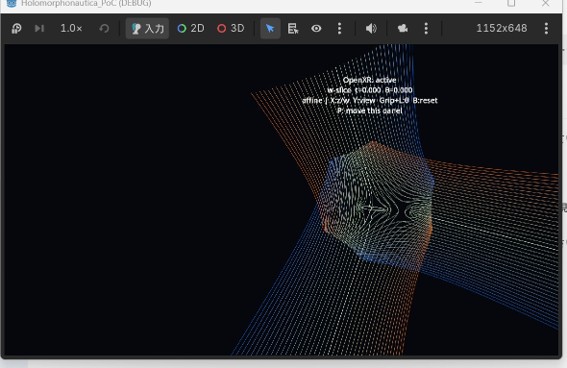
A white slice moves through the red-to-blue family. Watching the motion is more informative than picking a single still frame.白い切断が赤青グラデーションの族の中を動きます。静止画一枚より、動かして見る方が様子をつかみやすい部分です。
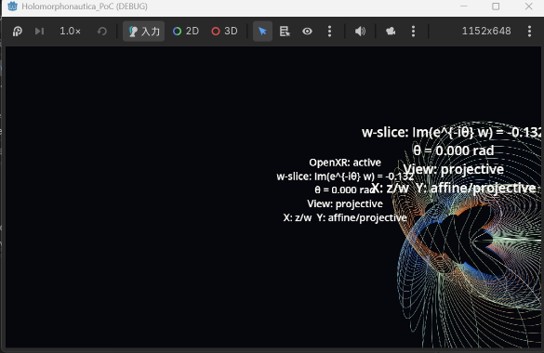
The conspicuous displaced disk-like feature is one of the things that made the hole feel visible to us.少し逃げた位置に見える特徴的な円盤状の部分が、穴の存在をかなり強く示唆しているように感じられました。
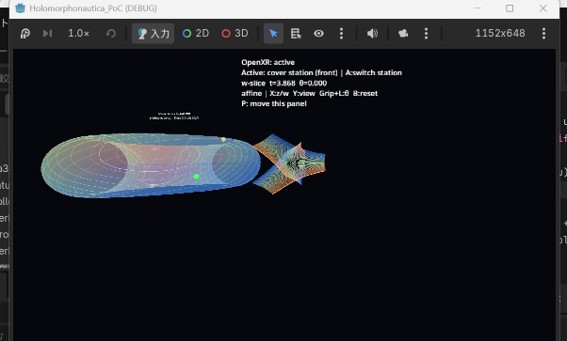
The white curve drawn simultaneously on the torus-like view helped us interpret the family on the right as something genuinely torus-like.トーラスらしい表示の上に同期して描かれる白線の動きが、右側の切断族を「たしかにトーラスっぽい」と読む助けになりました。
What seemed to become visible?何が見えてきた?
For us, the decisive point was not an isolated crossing, but the combination of two impressions: first, the coloured family itself leaves a conspicuous disk-like region that seems to avoid the middle rather than filling it in; second, the synchronized torus-like view shows a white curve moving in a way that is naturally read as going around a hole.
私たちにとって決め手だったのは、単独の交差そのものではなく、二つの印象の組合せでした。第一に、色付き切断族の側では、真ん中を埋めるのではなく、少しよけるように現れる特徴的な円盤状領域が見えます。第二に、同期しているトーラスらしい表示では、白線が穴の周りを回っていると読むのが自然な動きをします。
Taken together, these made the statement “the projective completion should have genus \(1\)” feel less like an abstract theorem remembered from elsewhere and more like something we could actually inspect with our eyes.
この二つを合わせて見ることで、「射影化したら種数 \(1\) のはず」という事実が、ただ外から知っている定理というより、「たしかに目で見て確認できた」と感じられるものになってきました。
What can the viewer do in VR?VRの中で何を動かせる?
| Move through the sceneシーン内を移動 | Walk around the family of slices and inspect it from different directions.切断族の周りを移動し、いろいろな方向から眺めます。 |
|---|---|
| Change the slice parameter \(c\)切断パラメータ \(c\) を動かす | The highlighted white real curve changes continuously as \(c\) moves.白く強調された実曲線が、\(c\) の変化に合わせて連続的に動きます。 |
| Switch the family切断族を切り替える | We can switch between families defined by \(\Im w=c\) and \(\Im z=c\).\(\Im w=c\) と \(\Im z=c\) の二つの切断族を切り替えられます。 |
| Rotate the slicing phase切断位相を回す | A further control varies \(\theta\) in \(\Im(e^{-i\theta}w)=c\), so nearby slice families can be compared.さらに \(\Im(e^{-i\theta}w)=c\) の \(\theta\) を動かして、近い切断族どうしを比べられます。 |
What role does this visualization play?この可視化は何をしてくれる?
Our aim is not to present the graphics themselves as the final mathematical result. Rather, we want to use 3D VR the way one informally uses quick plots in a CAS: to gain intuition, compare nearby situations, and decide what to check mathematically next.
私たちの狙いは、グラフィックそのものを最終的な数学的成果として主張することではありません。むしろ、計算機代数システムで簡単なグラフを眺めるときのように、3D VRを直観形成、近い状況の比較、次に何を数学的に確かめるべきかの判断のために使いたいのです。
In that sense, this page records a small but important success: for this elliptic curve, the genus-one picture felt visually accessible enough that we could say, with some confidence, “yes, this is beginning to look like a torus.”
その意味で、このページが記録しているのは、小さいけれど大事な成功です。この楕円曲線については、「ああ、これはたしかにトーラスに見えてきた」と、かなり手応えを持って言えるところまで来たと感じています。